Obseria Guard

Stop phishing before the click, in the browser and on the Mac

Obseria Guard checks websites, links and emails in real time, warns with a clear reason and reports every finding to your Obseria organization. As a Chrome extension and a macOS menu bar app.

Chrome, Edge and Brave · macOS 13 or later · Beta

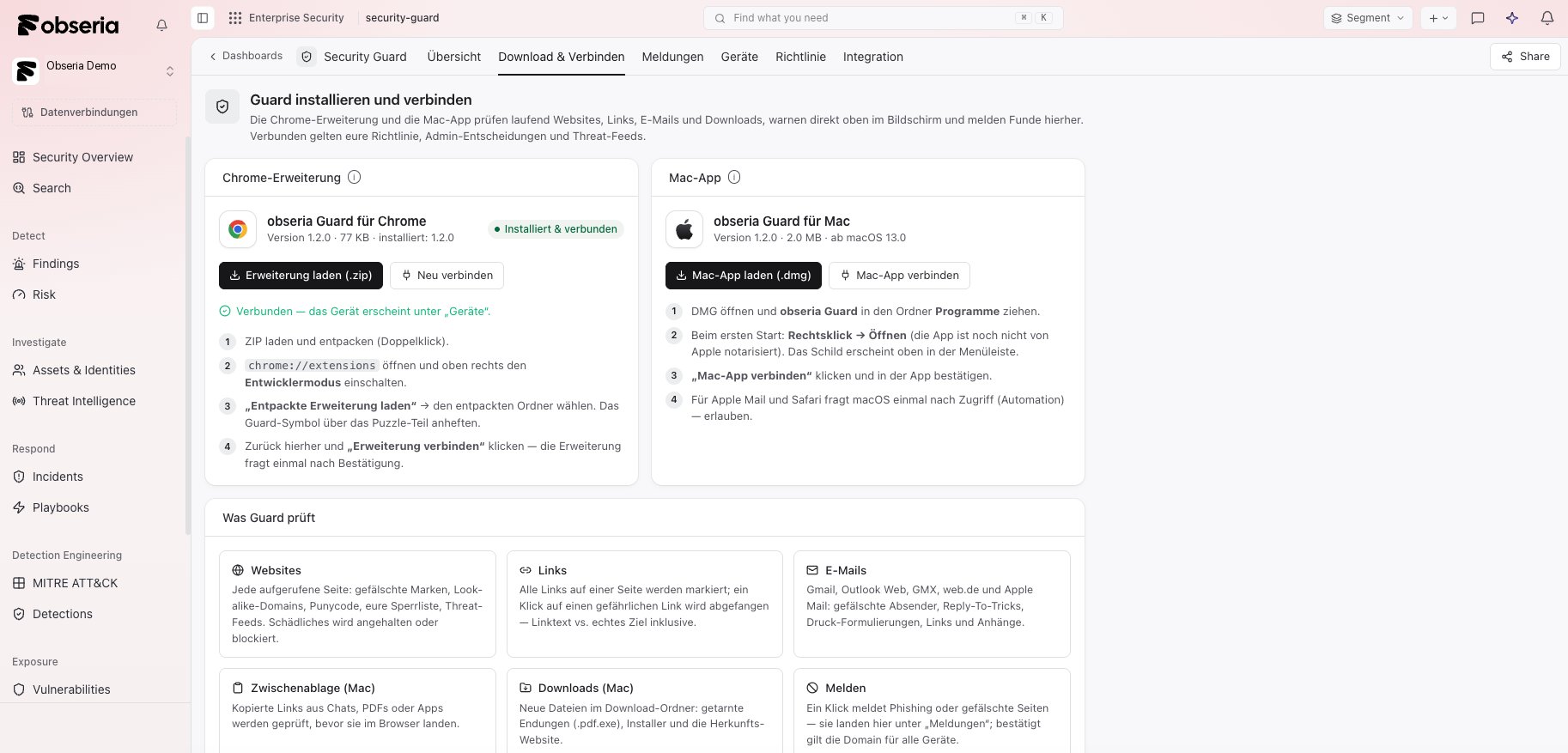
Obseria Security Guard download and connect page for the Chrome extension and the Mac app
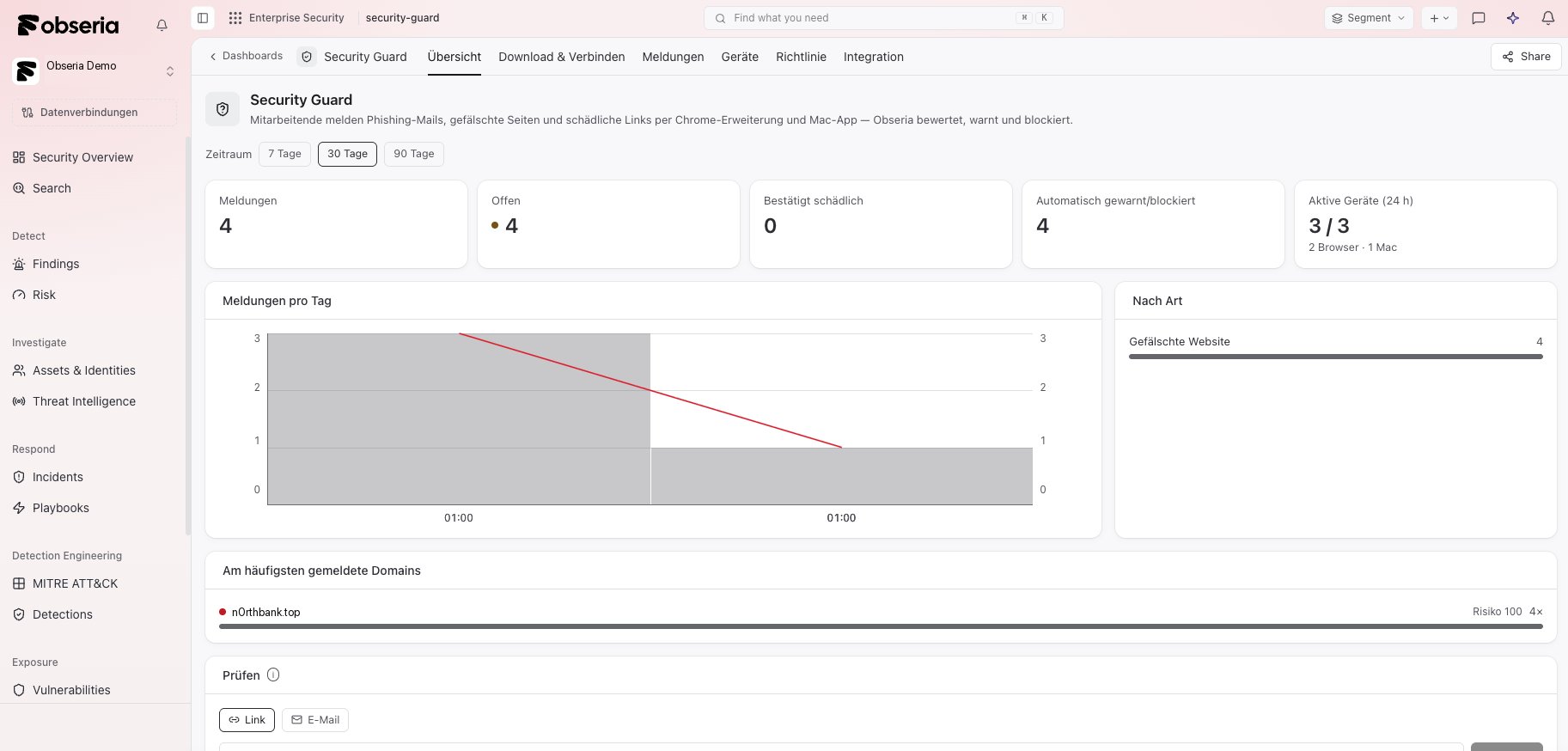
Obseria Security Guard overview with reports, open items, active devices and most reported domains
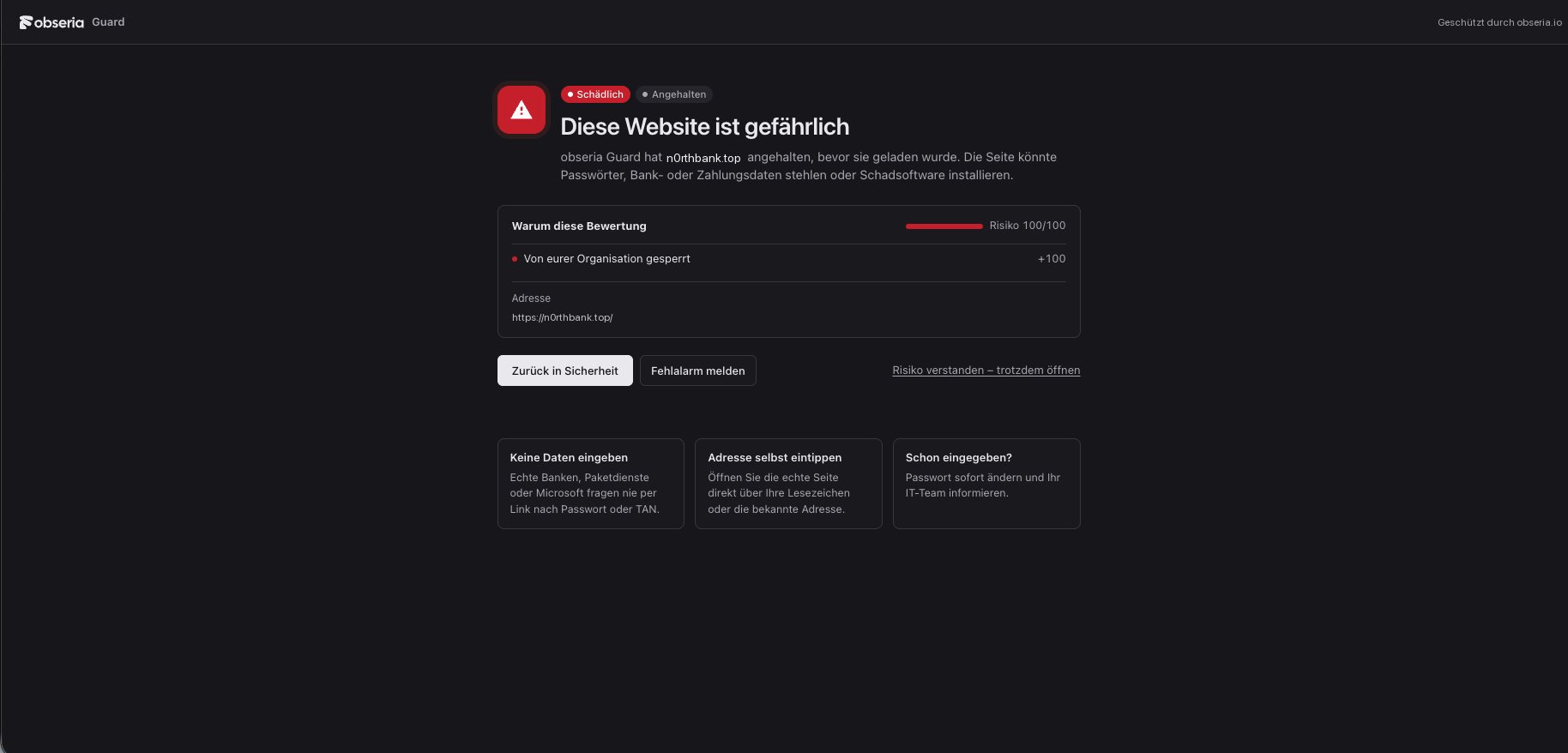
Obseria Guard block page explaining why a dangerous website was stopped
Benefits

Protection that people understand

Guard does not just block. It shows what it found, so warnings are taken seriously instead of clicked away.

Protection before the click

Links on a page are rated as it loads and marked before anyone clicks. A click on a risky link is intercepted, a dangerous page is blocked or shown behind a warning.

Every warning has a reason

Each verdict comes with a risk score and the signals behind it, from lookalike domains to a link text that points somewhere else. No verdict without an explanation.

Connected to your security team

Findings are reported to your Obseria organization. When an admin confirms a domain as malicious or marks it as harmless, the decision applies to every device.

What Guard checks

Four ways in, one assessment

01

Websites and links

Every page visit is checked. Links on a page are marked, hovering shows the real destination, a link text that differs from it and the reasons. Redirect links, for example from Microsoft Safe Links or Google, are unwrapped, so the real target is assessed.

02

Emails

In Gmail and Outlook on the web, and in Apple Mail on the Mac: sender and display name, reply-to addresses on other domains, display names that claim a brand, pressure in the text, payment change requests, dangerous attachments and every link.

03

Clipboard (Mac)

Links copied from chats, PDFs or apps are checked before they land in the browser. On request the app clears a dangerous link from the clipboard.

04

Downloads (Mac)

New files in the Downloads folder are checked: disguised endings such as .pdf.exe, installers and the website they came from. On request a dangerous file goes straight to the bin.

Password warning Chrome warns when a password is entered on a page that looks suspicious.

Verdicts

Transparent scoring instead of a black box

Guard combines weighted signals into a risk score from 0 to 100. From 35 a target is suspicious, from 70 it is malicious. A local engine works even offline, the Obseria server adds threat intelligence feeds, the decisions of your admins and reports from colleagues.

Sensitivity can be set to cautious, balanced or strict. What the server classifies as malicious stays malicious, whatever the setting.

  • Lookalike domains, swapped characters and punycode
  • Brand names on domains that do not belong to the brand
  • Bare IP addresses, link shorteners and free hosting or tunnel services
  • Executable downloads and disguised double endings
  • Link text that names a different destination than the link
  • Threat intelligence blocklists and reports from your own team

For admins

One policy for the whole team

In Obseria, Security Guard brings devices, reports and the policy together. Decide whether dangerous pages are blocked or shown behind a warning, and whether people may continue anyway.

  • Block or warn mode, with or without “open anyway”
  • Trusted and blocked domains that also apply offline
  • Registration tokens for any number of devices, valid for 90 days
  • Rollout via Chrome policy and macOS configuration profile (MDM)
  • Report inbox: confirm as malicious or mark as harmless
  • Overview of reports per day, most reported domains and active devices
How it works

Up and running in three steps

  1. Step 1

    Install

    Download the Chrome extension or the Mac app in Obseria under Security Guard. The extension runs in Chrome, Edge, Brave and other Chromium browsers.

  2. Step 2

    Connect with one click

    “Connect extension” or “Connect Mac app” hands over a one-time token. Alternatively paste a token or roll Guard out centrally via Chrome policy or MDM.

  3. Step 3

    Protected and reporting

    Warnings appear right on the device. Findings and reports land in your Obseria organization, where admins assess them for everyone.

Privacy

Checks what it has to, sends only what it needs

  1. 01

    The local detection engine works without a connection

  2. 02

    Links on a page are rated locally only

  3. 03

    The server is asked for page visits, clicks on marked links, opened emails and manual checks, with a 10 minute cache

  4. 04

    Automatic reports at most once every six hours per target

  5. 05

    Email excerpts are limited to 1,000 characters and can be switched off

  6. 06

    History and JSON export stay on the device and can be cleared at any time

Data in your Obseria organization is processed in the region you chose.

Platforms

For the browser and the Mac

Chrome extension Beta

Chrome, Edge, Brave and other Chromium browsers, Chrome 116 or later, Manifest V3.

Beta: currently installed in developer mode, the Chrome Web Store listing follows.

Mac app Beta

Menu bar app for macOS 13 or later, Apple Silicon and Intel.

Beta: not yet notarized by Apple, so the first start is via right-click and Open.

For your team

Protect your employees and with them your whole company

Phishing targets people, not servers. One click on a fake sign-in page or a disguised attachment is all an attacker needs. Obseria Guard stands by every employee at the moment it matters: in the browser, in the inbox and on the Mac.

  • For every workplace: Chrome, Edge, Brave and Mac
  • Clear warnings in plain language instead of jargon
  • One click reports anything suspicious to the security team
  • Rolled out centrally, nobody has to type a token
SalesFinanceHRITManagementSupportPhishing emailFake sign-in pageDisguised download
FAQ

Questions about Obseria Guard

Answers on browsers, email services, privacy and rollout. Anything missing?
Contact us

Obseria Guard FAQ

Obseria Guard is a Chrome extension and a Mac app that check websites, links and emails for phishing and fraud before the click. Every finding is reported to Security Guard in your Obseria organization.

The extension runs in Chrome, Edge, Brave and other Chromium browsers from Chrome 116. The Mac app needs macOS 13 or later and runs on Apple Silicon and Intel.

In the browser Gmail and Outlook on the web, on the Mac Apple Mail. Guard assesses sender, authentication results, links and attachments of opened emails.

No complete history. Links on a page are rated locally. The server is only asked for page visits, clicks on marked links, opened emails and manual checks. Automatic reports are sent only for malicious findings, at most once every six hours per target.

Only if the policy allows it. With “users may override warnings” switched off, the protection switches are locked and warnings are binding. In block mode, malicious pages cannot be opened at all.

With a registration token that enrolls any number of devices, or centrally via Chrome policy and a macOS configuration profile. Each device then gets its own device token.

Guard is new and currently in beta. The Chrome extension is installed in developer mode until the Chrome Web Store listing is available, the Mac app is not yet notarized by Apple.

Protect your team before the click

Try Obseria Guard with your Obseria organization or let us show it to you.