
AI Security Investigations: answers from your data, decisions by your team
Ask security questions in plain language, see related alerts grouped into one problem with a likely cause and let your own assistants read the same data. Your team checks the evidence and decides.
- Security search
- Plain-language questions and field=value filters
- Problems
- Severity, category, affected entity and likely cause
- Own assistants
- Read-only MCP access for Claude, Cursor, Copilot
- Your data
- Not used to train AI models
Product tour
How your team works with AI Security Investigations
From the first question to the follow-up task: these views come straight from the Obseria app. Pick an area or let the tour run on its own.01 / 05
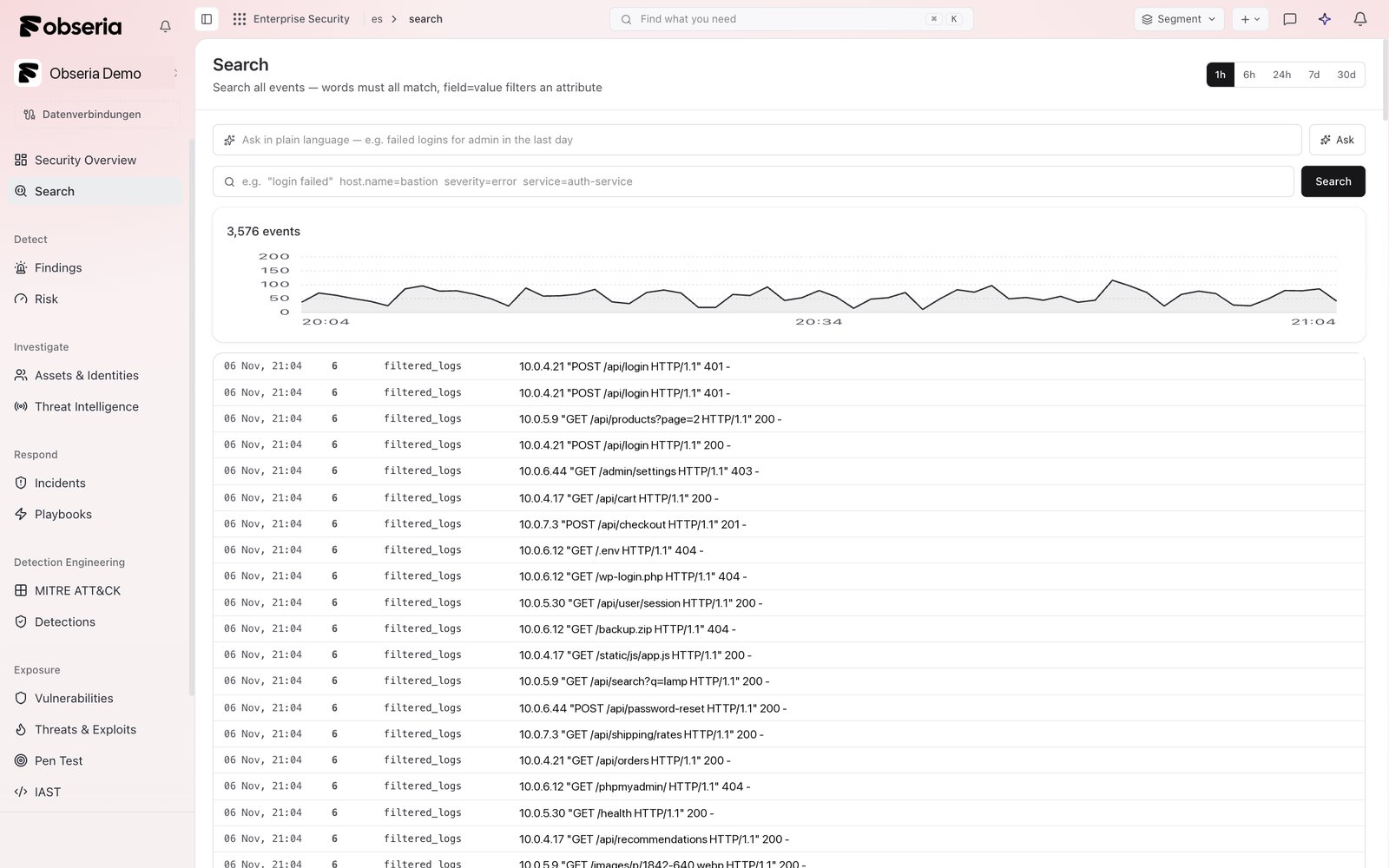
Ask security questions in plain language
Type a question such as “failed logins for admin in the last day”, or search with words and field=value filters, and get real, checkable events.
- Plain-language questions
- field=value filters
- 1 hour to 30 days
02 / 05
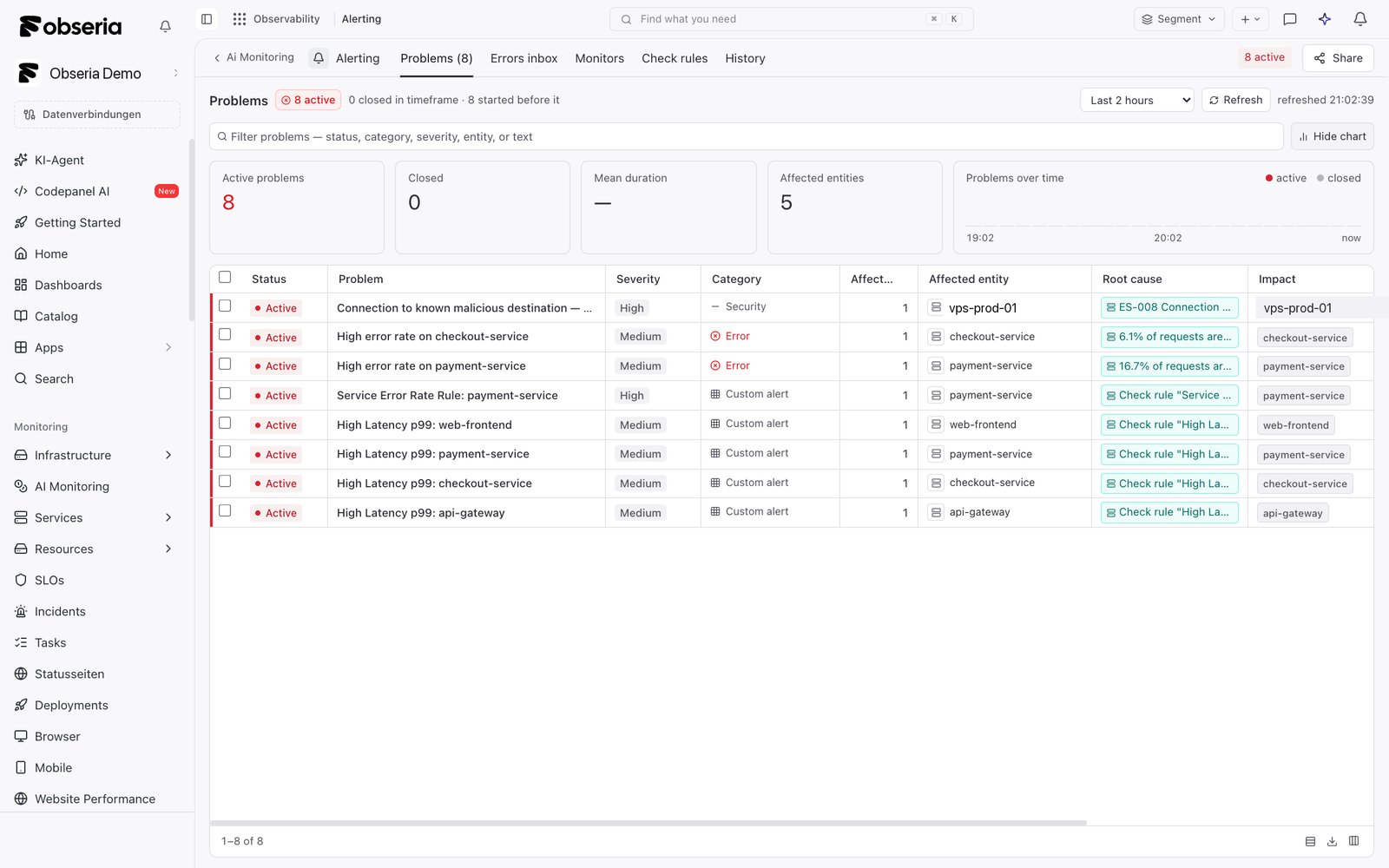
One problem with a likely cause
Related anomalies become one problem with severity, category such as security, affected entity, impact and the likely root cause.
- Category security, error or custom alert
- Root cause column per problem
- History of problems over time
03 / 05
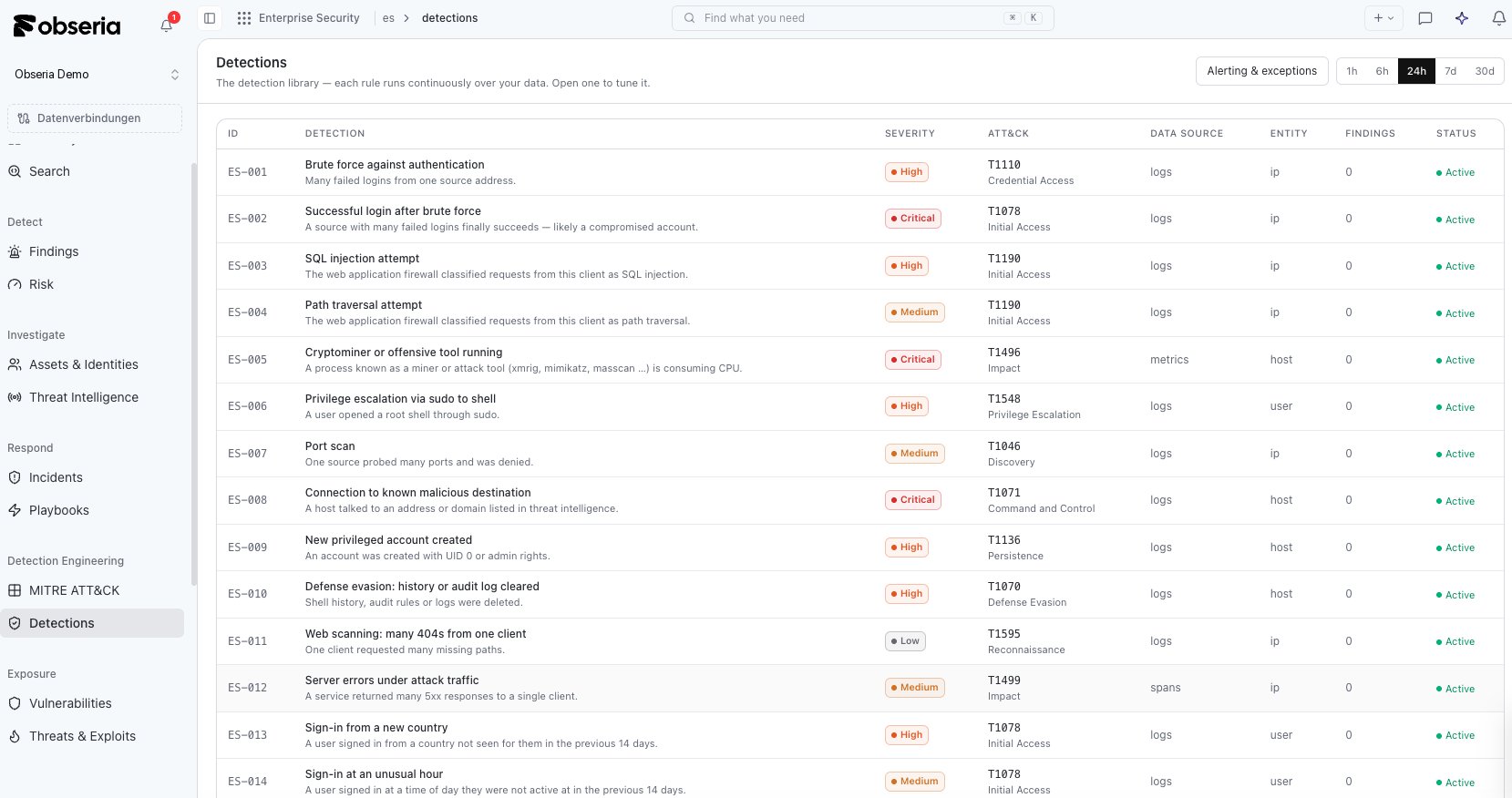
Detection rules that feed the investigation
A library of detection rules with severity, MITRE ATT&CK technique, data source and entity creates the findings an investigation starts from.
- Brute force, scans, malicious destinations
- Entity: IP address, host or user
- Indicators from public threat feeds
04 / 05
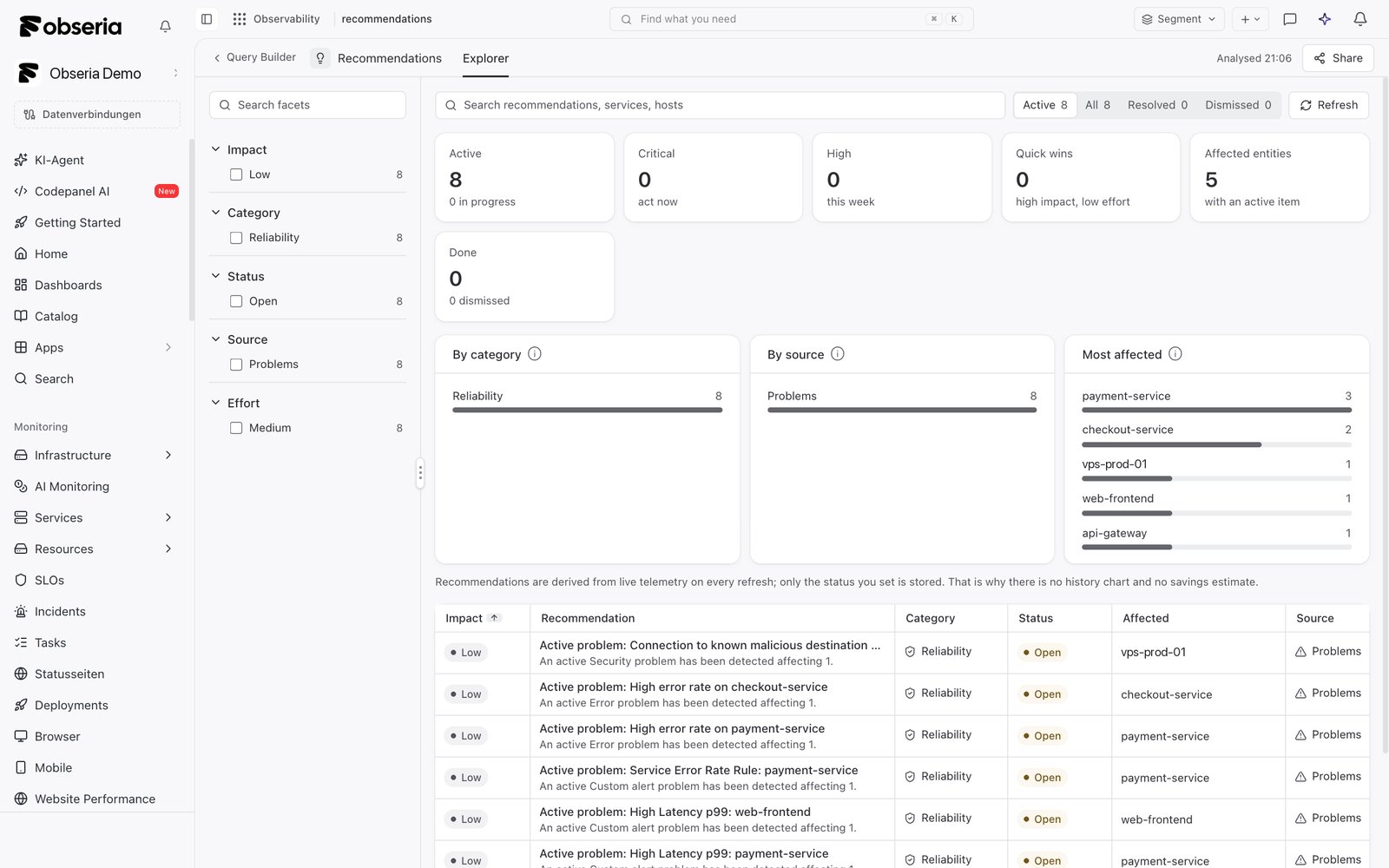
Concrete suggestions your team can work through
Recommendations on reliability, missing alerts, cost and configuration, each with the affected entity, impact, effort and status.
- Impact and effort per item
- Quick wins at a glance
- Facets for category, status and source
05 / 05
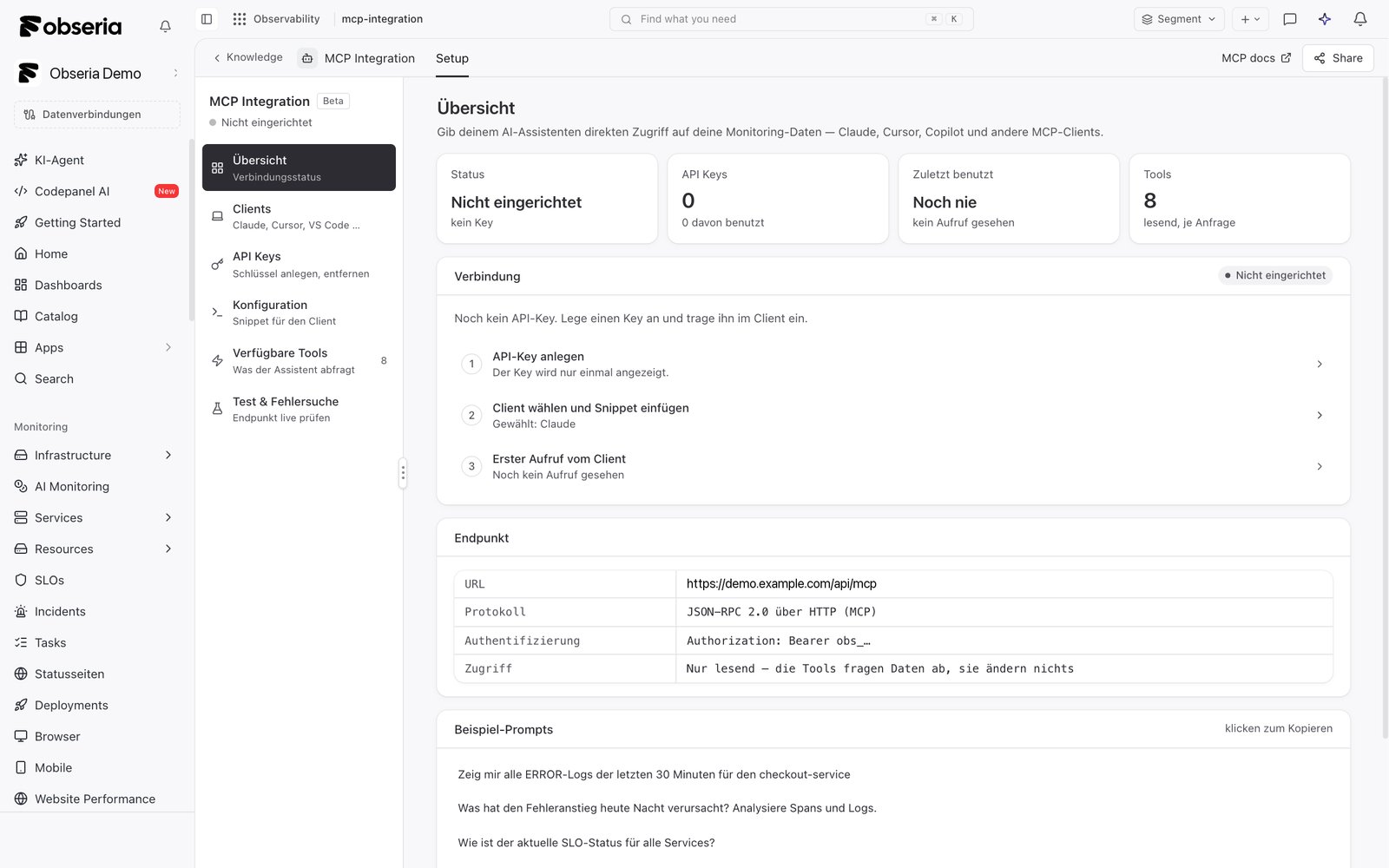
Your own AI assistant on the same data
The MCP server gives Claude, Cursor, Copilot and other MCP clients read-only access to your monitoring data with an API key per client.
- Read-only tools
- API key per client
- Example prompts to copy
Capabilities
What AI-assisted investigations include
Security search, problems with a likely cause, anomaly detection, recommendations and AI assistants on your own data.Problems and root cause analysis
Groups related anomalies into one problem and names the likely root cause.
Learn more →Recommendations
Suggests concrete improvements: missing alerts, cost savings and configuration errors.
Learn more →MCP server for AI agents
Provides your data to AI assistants via the Model Context Protocol.
Learn more →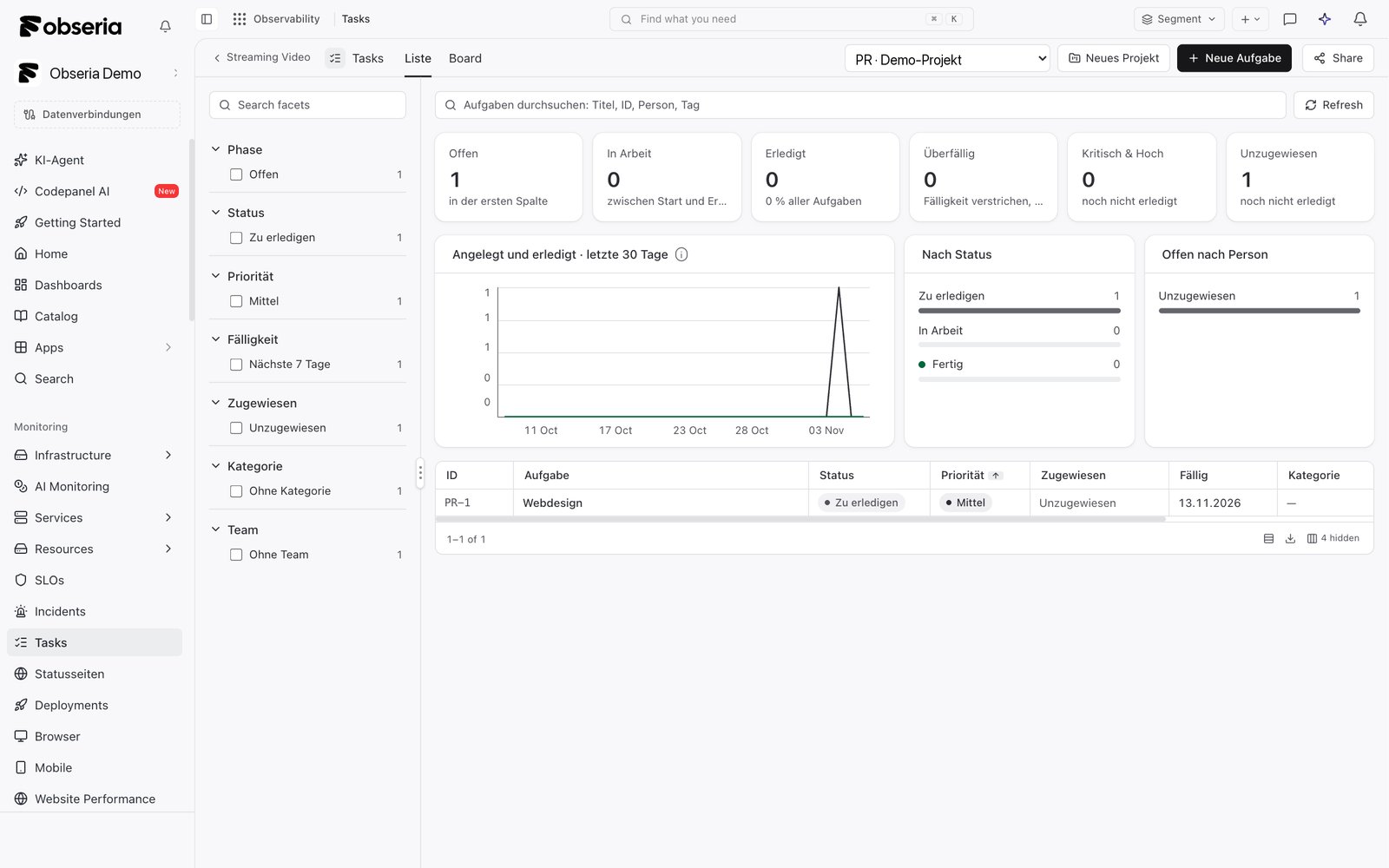
- Obseria Agent
- Anomaly detection
- Threat intelligence
How it works
From a question to a verified answer
Five steps of an investigation with AI support, with people deciding at every step.- HighExample findingConnection to known malicious destinationvps-prod-0101
Signal
A detection rule creates a finding, a check rule fires or a colleague asks whether a pattern in the logs is normal.
- Example question02
Ask
Ask the security search in plain language, for example for failed logins of a user, or narrow it down with field=value filters and a time range.
- Example · 1 problem, likely cause namedSecurity3Error2Custom alert103
Group
Related anomalies appear as one problem with severity, category, affected entity and the likely root cause, instead of a stream of single alerts.
- Events opened
- Cause confirmed in logs
- Hypothesis documented
04Verify
Open the events, logs and traces behind the answer and confirm or discard the hypothesis. The Obseria Agent helps with follow-up questions.
- Task created · rule improved




 05
Follow up
Record the result as a task or incident, improve the detection rule and work through recommendations such as missing alerts.
In depth
How AI Security Investigations works
Ask security questions in plain language
The security investigator searches across all security events of your organisation. You can work like an analyst, with words that must all match and field=value filters such as host.name=bastion severity=error, or you can type a question in plain language, for example “failed logins for admin in the last day”.
Either way, the result is the same kind of answer: the number of matching events, a chart over the chosen range from one hour to 30 days and the events themselves with time and source. Because the answer is a list of real events, it is easy to check whether the question was understood correctly.
This lowers the barrier for people who do not search security data every day, such as developers on call, without hiding the data from those who do.
- Questions in plain language
- Words and field=value filters
- Time ranges from 1 hour to 30 days
- Answers as real, checkable events
One problem with a likely cause instead of a stream of alerts
When several rules fire because of the same underlying issue, Obseria Intelligence groups the related anomalies into one problem. The problem list shows status, severity, category, such as security, error or custom alert, the number of affected entities, the affected service or host and the impact on other entities.
A root-cause column names the likely cause, for example the detection rule behind a connection to a known malicious destination or the check rule that triggered. It is a starting point for the investigation, not a verdict: the hint refers to the data behind it and should be confirmed in events, logs or traces.
Anomaly detection adds signals that no fixed threshold would catch: services and operations are compared on p99 latency, error rate and throughput, and deviations are rated by how far they are from normal.
- Severity, category and affected entity
- Likely root cause per problem
- Anomalies without fixed thresholds
- A hint to verify, not a verdict
AI assistants that work on your data, read-only where it matters
The Obseria Agent is the AI assistant inside the product. It answers questions about your data, helps to investigate problems and suggests next steps, so your team gets to the relevant data without writing a query first.
If your team prefers its own assistant, the MCP server, currently in beta, gives MCP clients such as Claude, Cursor or Copilot access to your monitoring data. Access uses an API key per client and is read-only: the tools query data and change nothing. Keys are created and removed in the app.
Neither the agent nor external assistants change your systems on their own. Repeatable actions, such as creating a ticket or sending a message, run only through workflows you define yourself in Obseria Automation.
- Questions, investigation and next steps
- MCP access for Claude, Cursor, Copilot
- Read-only tools with API keys
- No autonomous changes to your systems
From the answer to work that gets done
An investigation is only finished when its result leads somewhere. Recommendations in Obseria turn what the platform sees in your telemetry into concrete items: reliability issues from active problems, missing alerts, cost savings and configuration errors, each with the affected entity, impact and effort.
Security incidents in the Cloud SIEM record who investigates what and what was found, and tasks with priority, assignee and due date track the follow-up work, as a list or on a board. Detection rules and threat intelligence indicators from public feeds feed new findings into the same process.
Your data stays under your control: customer data is not used to train AI models, AI features can be switched off at organisation level and data is hosted in the EU.
- Recommendations with impact and effort
- Security incidents with owner and findings
- Tasks as a list or board
- AI features can be switched off
Integrations
Bring the answers to the tools you use
Connect your own AI assistants via the MCP server and route alerts and follow-up work to Slack, Microsoft Teams, PagerDuty, Jira or GitHub.- MCP
 Claude
 Cursor
 Copilot
- Slack
- Microsoft Teams
 PagerDuty
- Jira
- GitHub
 OpenTelemetry
Guide
AI-assisted security investigations explained
What AI-assisted security investigations are
A security investigation starts with a signal, such as an alert, a finding or a question from a colleague, and ends with an answer: is this an attack, a misconfiguration or harmless noise, what is affected and what should happen next. Most of the time in between is spent collecting context: searching logs, comparing time ranges, checking which host or user is involved and whether the same pattern appeared before.
AI-assisted security investigations use AI to shorten exactly this part. The AI translates a question into a search, summarises what the data shows, groups related signals and suggests where to look next. The decision about what happened and what to do stays with people.
Where AI helps in security analysis, and where it does not
AI is useful where the work is repetitive and the result can be checked:
- Asking instead of writing queries: “failed logins for admin in the last day” is faster to type than a search with the right field names, especially for people who do not work with the data every day.
- Reducing noise: several alerts caused by the same issue are easier to handle as one problem with a likely cause.
- Spotting the unusual: anomaly detection highlights services whose latency, error rate or throughput deviate strongly from normal, without fixed thresholds.
- Suggesting next steps: a list of concrete items, such as a missing alert or a configuration error, gives the team a starting point.
AI is not a replacement for judgement. It can be wrong, it only sees the data you send, and a plausible explanation is not proof. Good tools therefore show the data behind every answer, so it can be verified before anyone acts.
Best practices for using AI in investigations
- Verify before you act. Treat an AI answer or a suggested root cause as a hypothesis. Open the events, logs or traces it refers to and confirm it.
- Keep humans in charge of changes. Blocking an address, rotating a key or rolling back a release should be a decision by a person, or a workflow you defined explicitly in advance.
- Control what the AI can see. Mask personal data before storage, use read-only access for external assistants and check where your data is processed.
- Write down what you learn. Turn findings into tasks, runbooks and better detection rules, so the next investigation starts further ahead.
- Measure the basics. Time to acknowledge and time to resolve show whether investigations actually get faster.
What to look for in an AI security tool
When you evaluate AI security analysis, ask concrete questions: Does every answer link to the underlying data? Can the AI change systems on its own, and can you switch that off? Is customer data used to train models? Where is data processed? Can your own assistants access the data, and if so, read-only or with write access? Tools that answer these questions clearly are easier to introduce in a security team than tools that promise to do everything automatically.
Introducing AI support in a security team
AI support is adopted fastest when it starts where the risk is low and the benefit is easy to see:
- Start with read-only use: plain-language search, summaries and suggested causes change nothing and can be checked immediately.
- Clean up the data first: mask personal data at ingest and make sure the important sources, such as access and authentication logs, actually arrive.
- Agree on how answers are verified: for example, no ticket is closed and no address is blocked without a look at the underlying events.
- Automate only what you have defined: if a step repeats, build an explicit workflow for it rather than giving an assistant write access.
- Review after a few weeks: which questions did the AI answer well, where was it wrong, and which detection rules or runbooks should change?
Track a few metrics before and after: time from finding to first look, time to acknowledge and resolve incidents, the number of alerts per problem and how many suggested causes were confirmed. They show whether AI support saves time or only adds another screen.
How Obseria supports AI-assisted investigations
In Obseria, AI-assisted investigations combine several building blocks of Obseria Security Enterprise, Obseria Intelligence and Obseria AI Observability:
- Security investigator: free search across all security events with
field=valuefilters, and questions in plain language such as “failed logins for admin in the last day”, with time ranges from one hour to 30 days. - Problems and root cause analysis: related anomalies are grouped into one problem with severity, category such as security or error, the affected entity and the likely root cause, for example the detection or check rule that fired.
- Anomaly detection: services and operations are compared on p99 latency, error rate and throughput, and deviations are rated by how far they are from normal.
- Recommendations: concrete suggestions on reliability, missing alerts, cost and configuration, with impact, effort and the affected entity.
- Obseria Agent: the AI assistant in the product answers questions about your data, helps to investigate problems and suggests next steps.
- MCP server: your own assistants, such as Claude, Cursor or Copilot, get read-only access to your monitoring data with an API key.
Detection rules, threat intelligence and findings from the Cloud SIEM provide the security signals; tasks and incidents capture the follow-up work. Obseria does not remediate problems on its own: repeatable actions run only through workflows you define yourself in Obseria Automation. Customer data is not used to train AI models, AI features can be switched off at organisation level, and data is hosted in the EU.
FAQ
Contact usQuestions about AI Security Investigations
Answers on features, setup and what is not included yet.AI Security Investigations FAQ
The combination of the security search with plain-language questions, problems with a likely root cause, anomaly detection, recommendations and the Obseria Agent, all working on the security and observability data in your organisation. It is part of Obseria Security Enterprise.
No. Obseria does not block, roll back or change anything on its own. The AI answers questions, groups signals and suggests next steps; your team decides. Repeatable actions run only through workflows you define yourself in Obseria Automation.
It is a hint taken from the data attached to the problem, for example the rule that fired. It is not proof. Confirm it in the events, logs or traces before acting.
Yes. The security search accepts questions such as “failed logins for admin in the last day” as well as word searches with field=value filters, over ranges from one hour to 30 days.
The data in your Obseria organisation, such as security events, logs, metrics and traces. Personal data such as email addresses, IBANs, card numbers, tokens, phone numbers and IPs can be masked at ingest, so it is never stored and never reaches AI features.
No. Customer data, inputs and results are not used to train or improve AI models. AI features can be switched off at organisation level.
Yes. The MCP server, currently in beta, gives MCP clients such as Claude, Cursor or Copilot read-only access to your monitoring data via an API key per client.
Obseria does not remediate incidents autonomously, does not write postmortems for you and does not predict future attacks. It is not a replacement for security analysts. Anomaly detection currently covers p99 latency, error rate and throughput of services and operations, and the MCP server is in beta.
Related products
Works together with
Security Enterprise
Cloud SIEM, detections, findings and investigations in one product.
→Obseria Intelligence
Problems with a likely root cause, anomaly detection and recommendations.
→AI SRE Agent
The Obseria Agent: questions about your data, investigation and next steps.
→MCP Server
Read-only access to your monitoring data for Claude, Cursor and Copilot.
→Security Log Analytics
Security and audit logs in one place, masked at ingest and searchable.
→Automation
Workflows you define yourself for repeatable actions, with no autonomous changes.
→Contact
See AI Security Investigations in action
In 30 minutes we show you how Obseria works in your environment and answer your questions on setup, privacy and pricing.
- No obligation, free of charge
- Usually answered within one business day
- Data in the EU
