
Cloud security
An overview of the security posture of your cloud environments.
We use essential functions to operate this website. With your consent, we would also use services for statistics and marketing. You decide which categories you allow and can change your choice at any time via “Cookie settings” in the footer. More in our privacy notice.
Obseria Consent Management · Your choice is stored for 12 months
See how secure your AWS, Azure, Google Cloud and Kubernetes environments are: failed rules by severity, assessed systems and resources, plus detections and runtime threats in the same place.
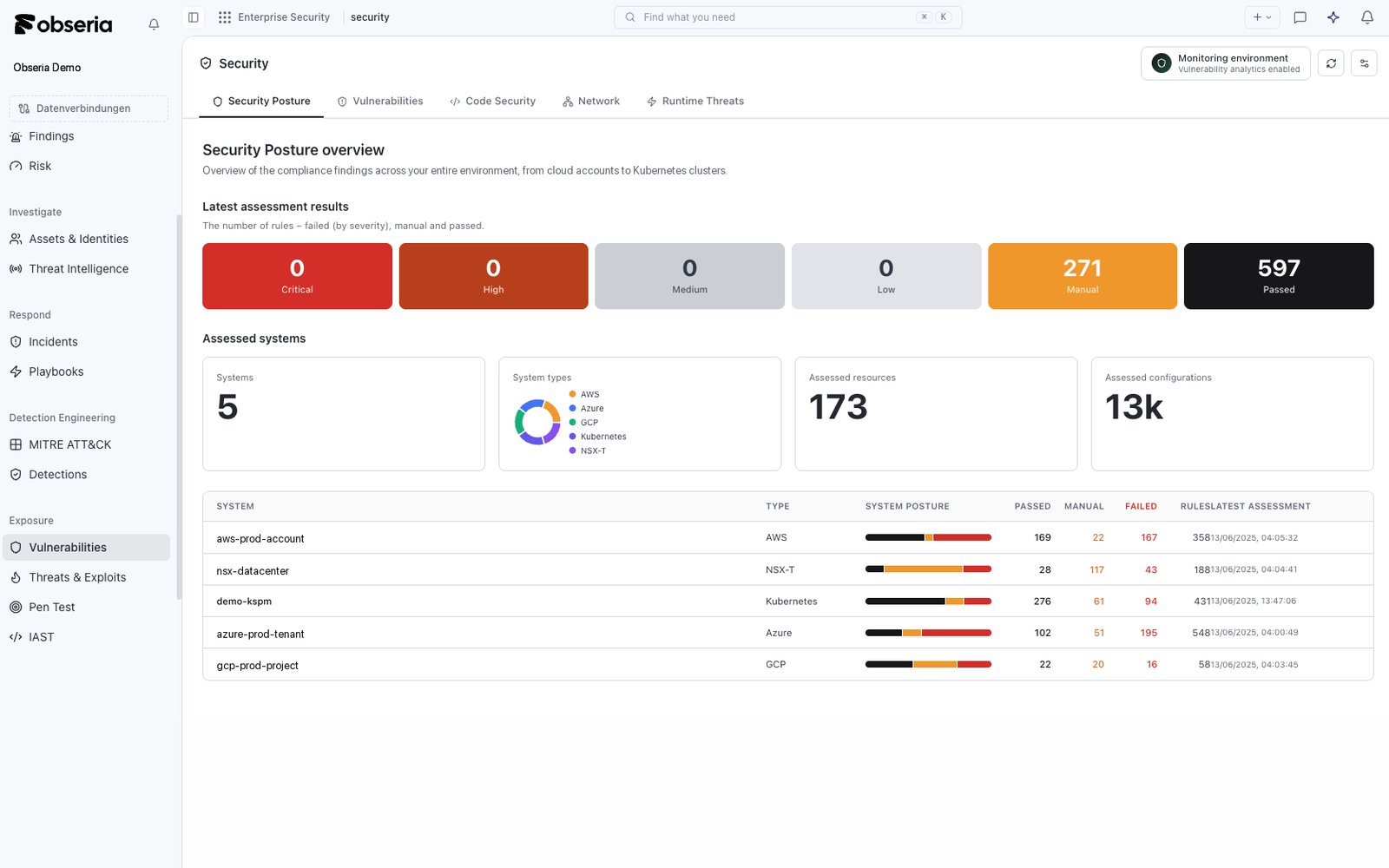
Failed rules by severity, manual checks and passed rules, assessed systems, resources and configurations, and the posture of every system.
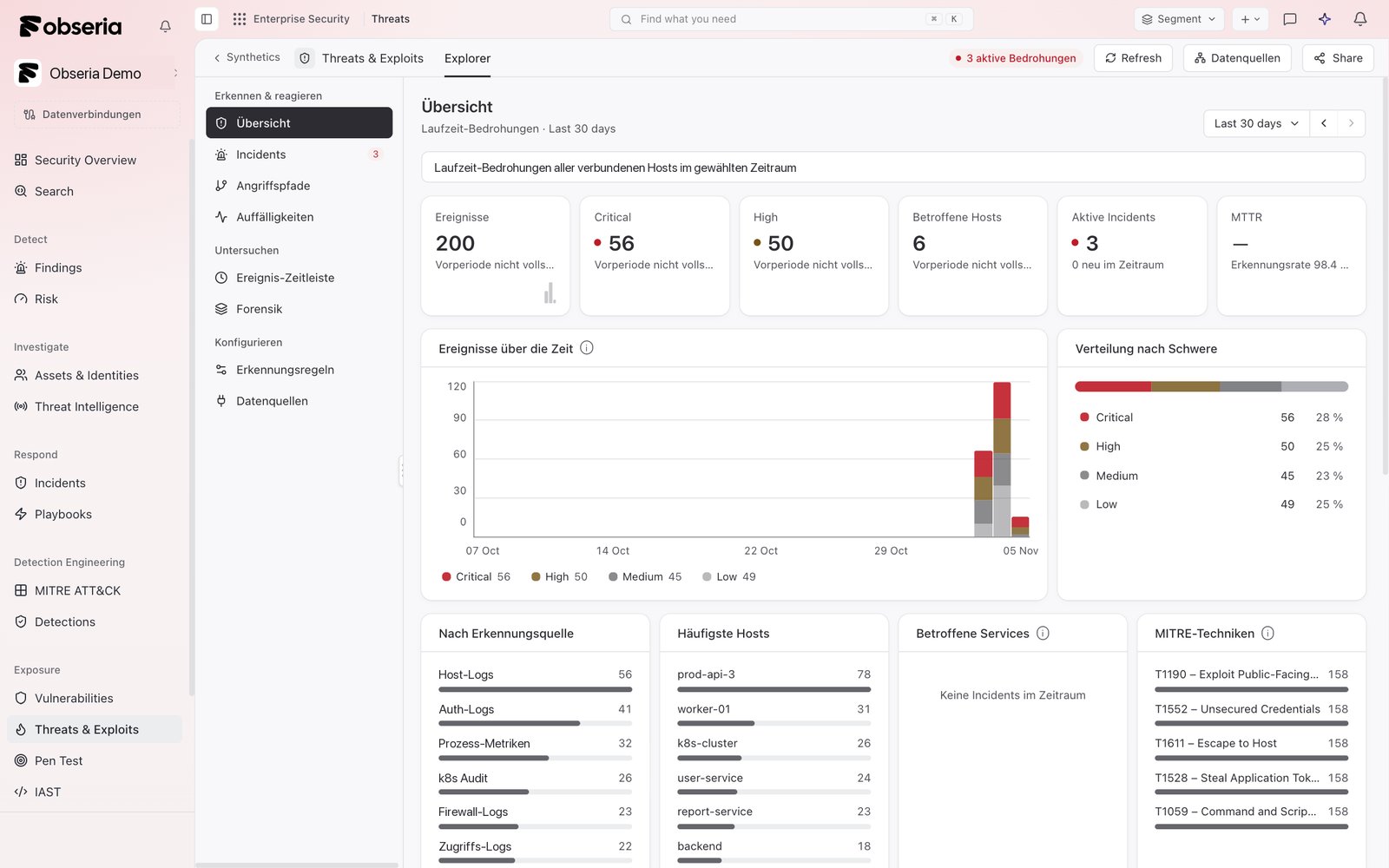
Events over time, distribution by severity, affected hosts, detection sources and MITRE techniques. Detection only, nothing is blocked.
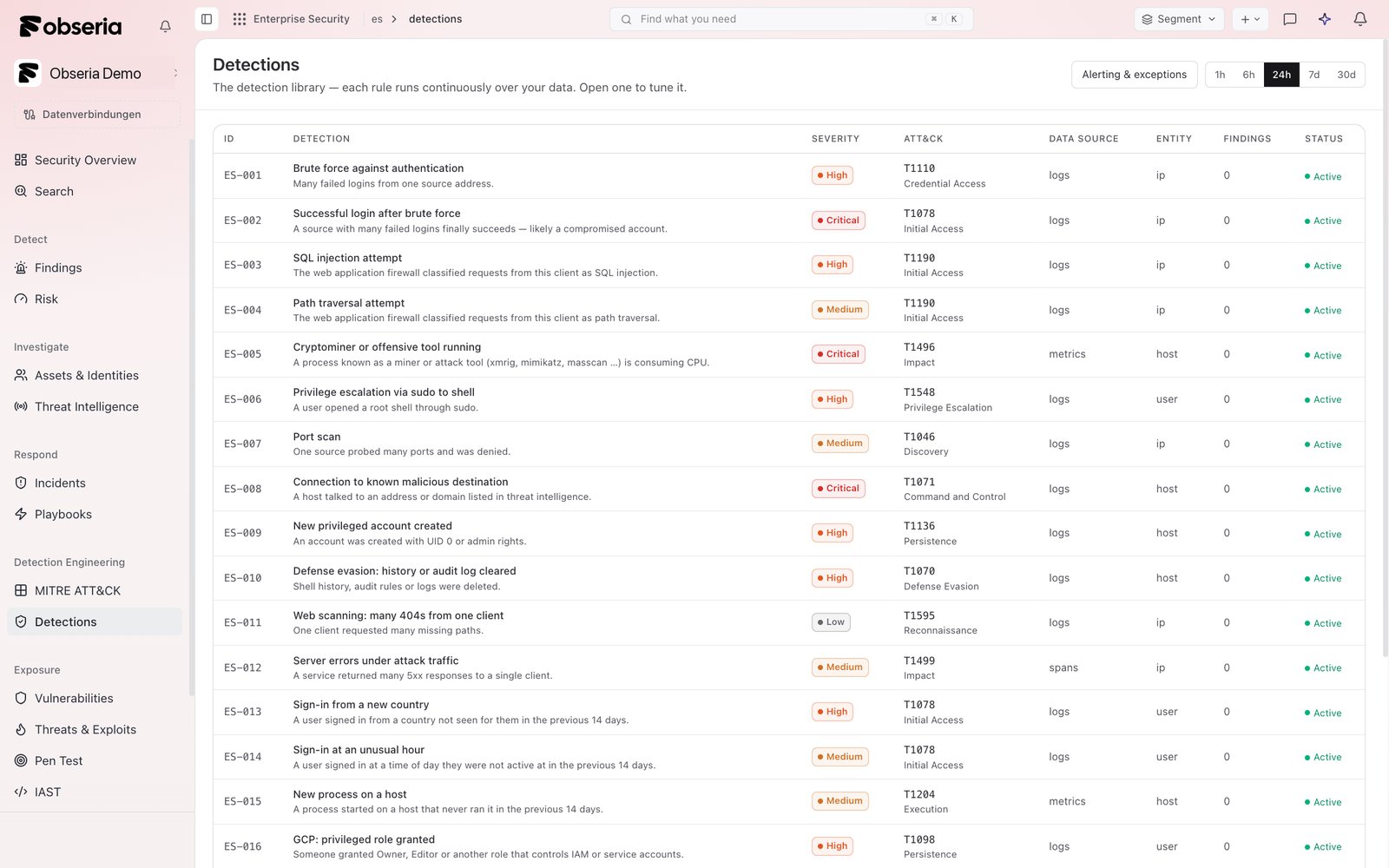
Each rule runs continuously over your data, for example “GCP: privileged role granted”, with severity, ATT&CK technique, data source and entity.
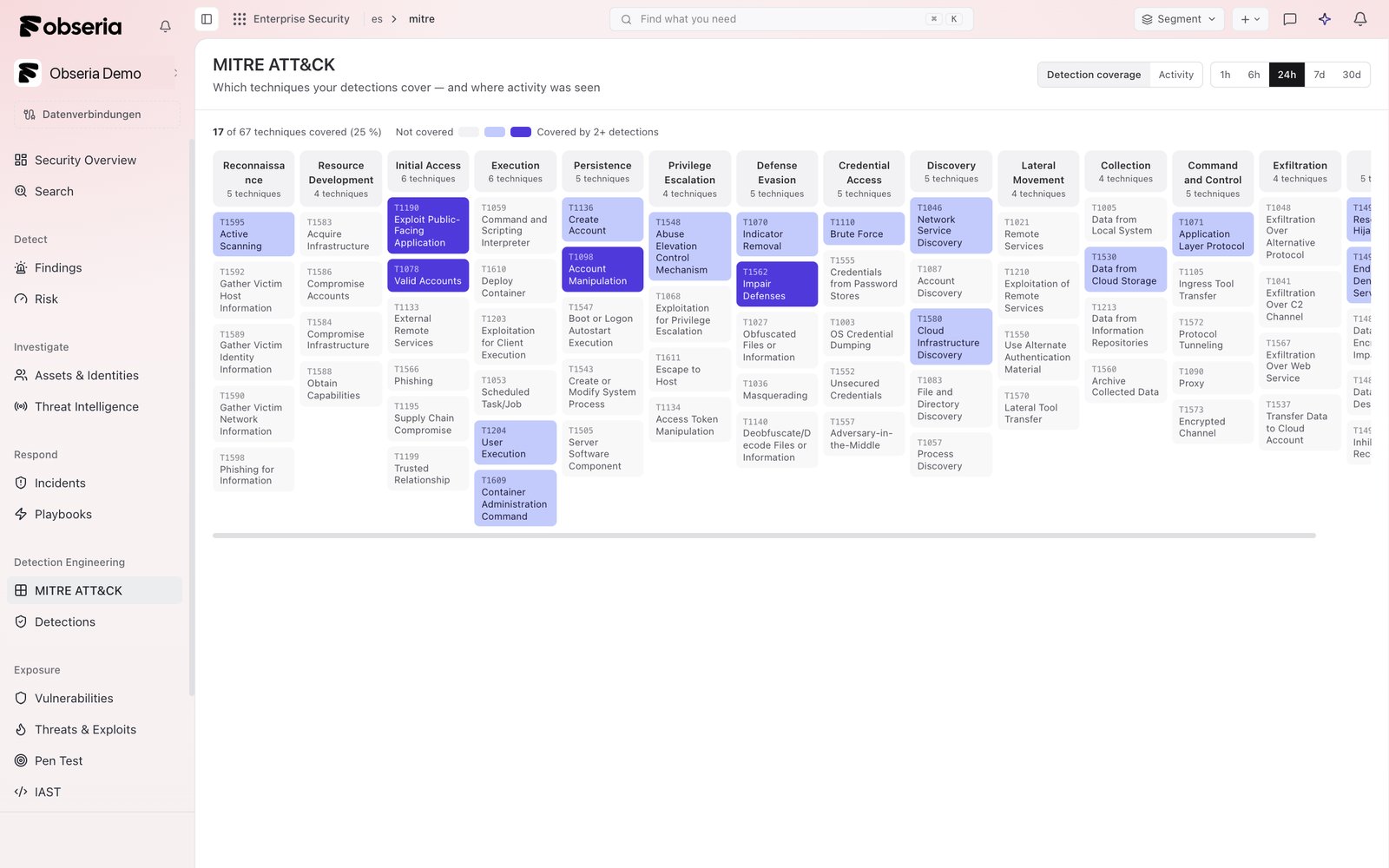
The MITRE ATT&CK matrix shows covered techniques per tactic and where activity was seen, so gaps in detection become visible.
Findings add up per entity until a threshold is reached; critical findings alert at once. Exceptions keep approved scanners and jobs quiet.
An overview of the security posture of your cloud environments.
Continuously checks cloud accounts against security rules and benchmarks.
Learn more →Detects suspicious behavior on hosts from host logs, such as cryptominers or new processes; detection only, nothing is blocked.
Learn more →


Connect AWS, Azure or Google Cloud with read-only credentials and add your Kubernetes clusters.
Obseria checks the systems against security rules and shows failed rules by severity, manual checks and passed rules.
The table per system shows which account, tenant, project or cluster has the most failed rules and when it was last assessed.
Detection rules and runtime threat detection evaluate cloud audit logs, sign-ins and host data next to the posture.
Security alerts go to Problems and your notification channels; owners fix the findings and the next assessment shows the result.
The security posture overview starts with the latest assessment results: how many rules failed, split into critical, high, medium and low, how many rules have to be checked manually and how many passed. That gives you one figure set for the whole environment instead of separate consoles per provider.
Below, Obseria shows what was actually assessed: the number of systems, the system types such as AWS, Azure, Google Cloud and Kubernetes, the number of assessed resources and the number of assessed configurations. This matters because a good score on a small share of your environment says little.
A table lists every system with its type, a posture bar, passed, manual and failed rules, the number of rules and the time of the latest assessment. You see at once which account or cluster needs attention first.
The cloud security area is organised in tabs. Next to the security posture you find vulnerabilities, code security, network and runtime threats, so the different views of risk stay in one place and use the same time range.
Be aware of one limit: the vulnerability list is currently filled from a fixed rule set and is not evaluated from your live telemetry. It is useful as a central list to prioritise and document findings, but it does not replace a scanner that inspects your running workloads.
Code security checks dependencies, secrets and infrastructure code such as Terraform and Kubernetes manifests from your GitHub repositories. Runtime threats show suspicious behaviour on connected hosts. Together they show where a risk comes from: configuration, code or behaviour.
A secure configuration lowers the risk, but it does not tell you whether someone is already inside. That is why cloud security in Obseria sits next to the Cloud SIEM. Its detection library runs continuously over your logs and includes rules for cloud events, for example “GCP: privileged role granted” when someone grants Owner, Editor or another role that controls IAM.
Each detection carries a severity, a MITRE ATT&CK technique, its data source and the entity it refers to, such as an IP address, a host or a user. The MITRE ATT&CK view shows which techniques your active detections cover.
Runtime threat detection adds host behaviour such as cryptominers, new processes or cleared audit logs. It only detects and reports; nothing is blocked.
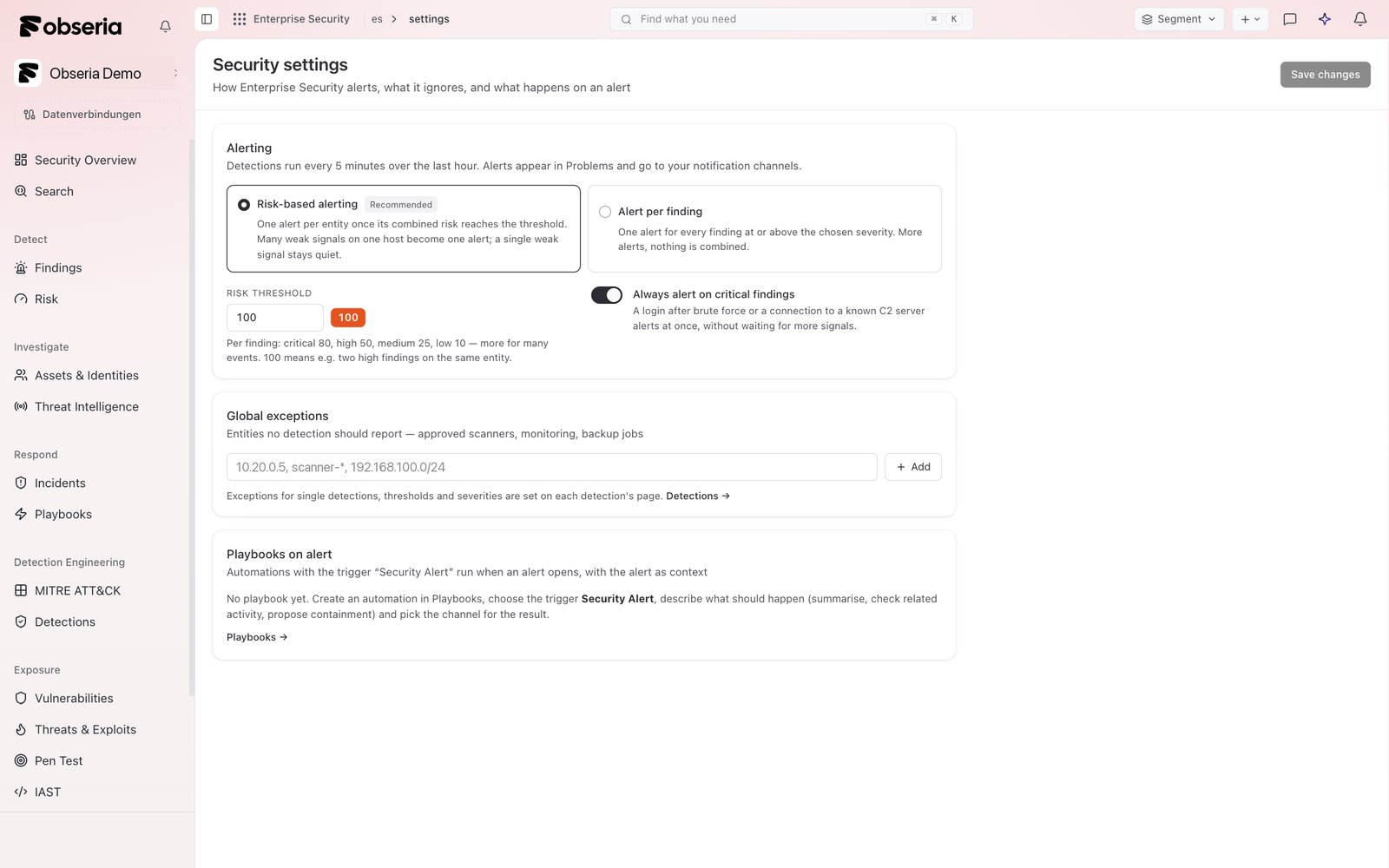
Security alerting in Obseria is set in one place. Detections run every five minutes over the last hour. With risk-based alerting, findings add up per entity, and an alert fires once the combined risk reaches a threshold you choose, so many weak signals on one host become one alert while a single weak signal stays quiet.
Alternatively, you can alert on every finding at or above a chosen severity. A switch makes sure critical findings, such as a login after brute force or a connection to a known command-and-control server, always alert at once.
Global exceptions keep approved scanners, monitoring and backup jobs out of your findings. Alerts appear in Problems and go to your notification channels, and playbooks with the trigger “Security Alert” can run when an alert opens.
AWSMicrosoft AzureGoogle CloudKubernetes Linux
 OpenTelemetry Collector
 OTLP
 GitHub
 Slack
 Microsoft Teams
 PagerDuty
Cloud security covers everything that keeps workloads, data and identities in AWS, Azure, Google Cloud and Kubernetes safe: secure configuration of accounts and services, controlled access, detection of attacks and a clear view of which risks are open right now. Unlike a classic data centre, the cloud changes every day. New accounts, buckets, roles and clusters appear through code and consoles, often without a security team looking at them.
That is why cloud security monitoring is less about a one-off audit and more about a continuous answer to three questions: How secure is our configuration? Is someone attacking or misusing our environment? And which of the open issues matters most?
Cloud providers secure the physical infrastructure and their managed platforms. Everything you configure on top is your responsibility: identities and permissions, network exposure, encryption settings, logging, the operating systems of your virtual machines and the workloads in your clusters. Most cloud incidents do not start with a broken provider, but with a misconfiguration on the customer side, for example a public storage bucket, an overly broad role or a disabled audit log.
Each block answers part of the question. The value comes from seeing them side by side, because a misconfigured account plus suspicious sign-ins on the same system is more urgent than either alone.
None of these needs a sophisticated attacker. They are found by automated scans within hours, which is why continuous checks matter more than an annual review.
Useful cloud security metrics are simple: failed rules by severity, the share of passed rules per system, the number of systems and resources that are actually assessed, the age of open findings and the number of security alerts per week. Teams that track these over time can show progress to management and auditors without building spreadsheets.
Check which clouds and platforms are covered, how accounts are connected (read-only credentials or agents), whether configuration checks and threat detection live in one place, how findings are prioritised, how alerts reach your team and where the data is stored. For teams in Europe, data location and a data processing agreement are part of the decision. Start with one account, review the findings with the owners of that account, agree on what "critical" means and then connect the rest.
In Obseria, cloud security is one area inside Security Enterprise. It brings the parts above together:
Cloud accounts are connected with read-only credentials. Data is stored in the EU.
An overview of the security posture of your connected environments: failed rules by severity, rules to check manually and passed rules, the number of assessed systems, resources and configurations, and a table per system. Tabs lead to vulnerabilities, code security, network and runtime threats.
AWS, Microsoft Azure and Google Cloud accounts, plus Kubernetes clusters. Hosts outside the cloud can be connected with the Obseria host agent or the OpenTelemetry Collector for runtime threat detection.
With read-only credentials. Obseria reads configuration and resources; it does not change anything in your accounts.
Cloud security is the overview across all security areas. Cloud security posture management is the part that checks cloud accounts against security rules and benchmarks in detail. Both use the same data; the CSPM page explains the rule checks.
Yes, through the Cloud SIEM in Security Enterprise. Detection rules evaluate security events such as cloud audit logs, sign-ins and access logs, and runtime threat detection looks at host behaviour. Both only detect and alert; nothing is blocked automatically.
Security alerts appear in Problems and go to your notification channels, for example Slack, Microsoft Teams, PagerDuty or email. You choose between risk-based alerting per entity and one alert per finding.
No tool makes an organisation compliant on its own. Obseria shows regulatory frameworks such as the GDPR as checkable controls and keeps the data in the EU, which helps you prepare audits and your own documentation. Obseria does not claim any certification on your behalf.
Obseria does not change cloud configuration or fix findings automatically, and it does not block attacks. The vulnerability list is currently filled from a fixed rule set, not evaluated from your live telemetry. If you need a specific benchmark or cloud service checked, talk to us before you rely on it.
Cloud SIEM, posture, threat intelligence and investigation in one product.
→Cloud accounts checked continuously against security rules and benchmarks.
→Security events, detection rules, findings and risk per entity.
→Regulatory frameworks such as the GDPR as checkable controls, data in the EU.
→Hosts, containers and services on AWS, Azure and Google Cloud.
→In 30 minutes we show you how Obseria works in your environment and answer your questions on setup, privacy and pricing.
