
Cloud security posture management
Continuously checks cloud accounts against security rules and benchmarks.
We use essential functions to operate this website. With your consent, we would also use services for statistics and marketing. You decide which categories you allow and can change your choice at any time via “Cookie settings” in the footer. More in our privacy notice.
Obseria Consent Management · Your choice is stored for 12 months
Obseria checks your cloud accounts and Kubernetes clusters continuously against security rules and shows failed, manual and passed rules per system, with read-only access.
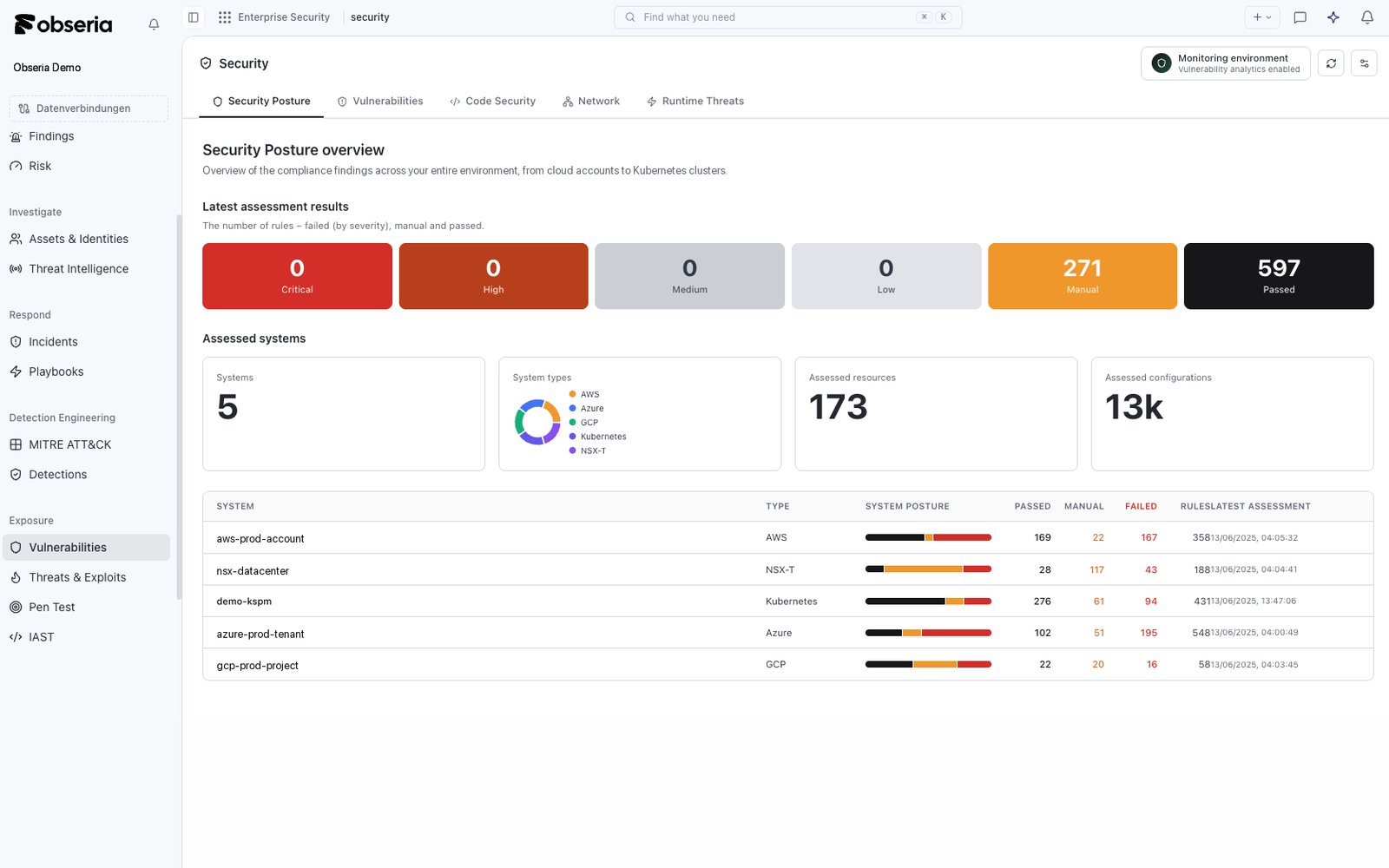
The latest assessment results by severity, the assessed systems, resources and configurations, and a posture bar for every account and cluster.
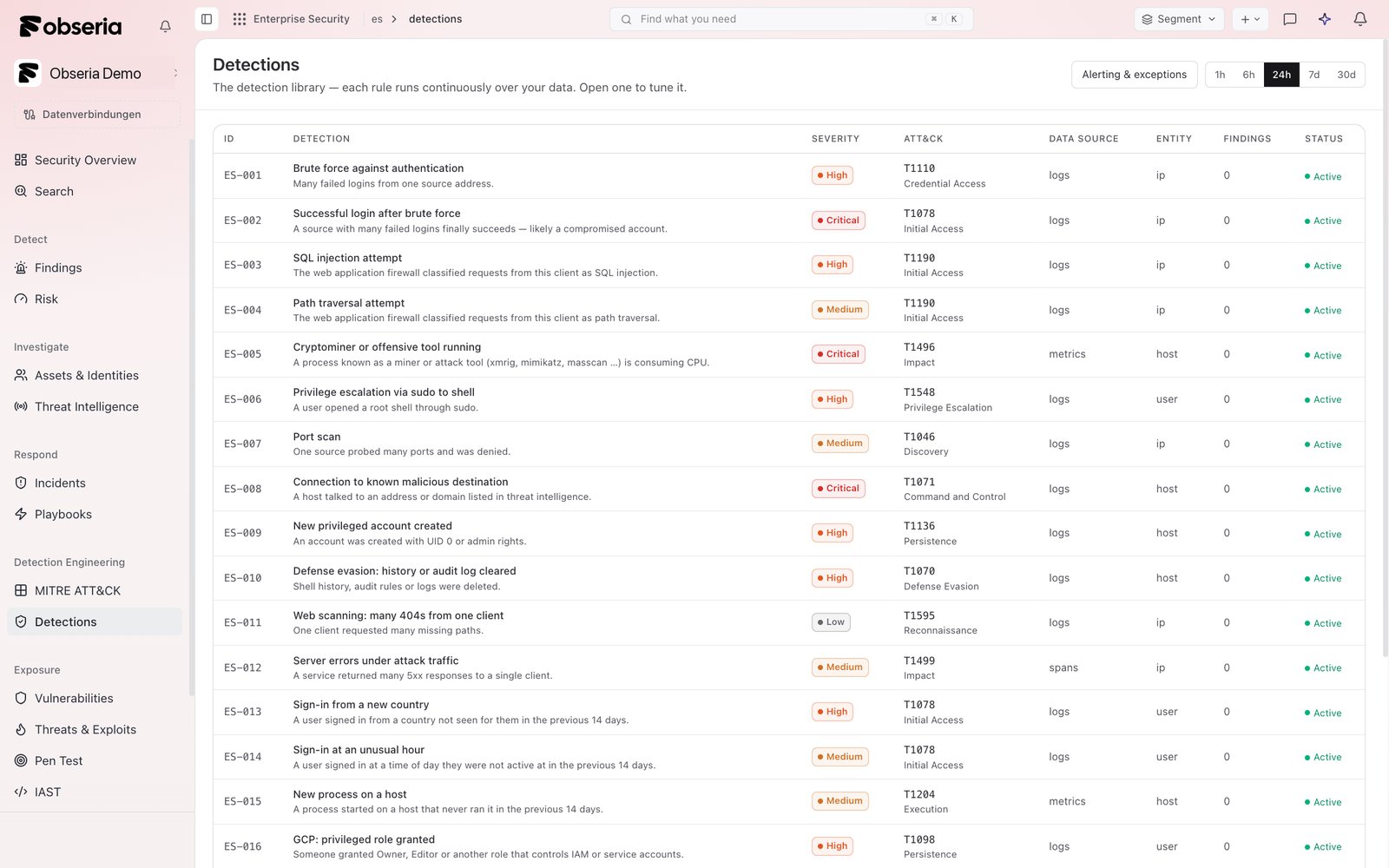
Posture shows what is configured badly; detections show when something risky happens, for example a privileged role granted in Google Cloud.
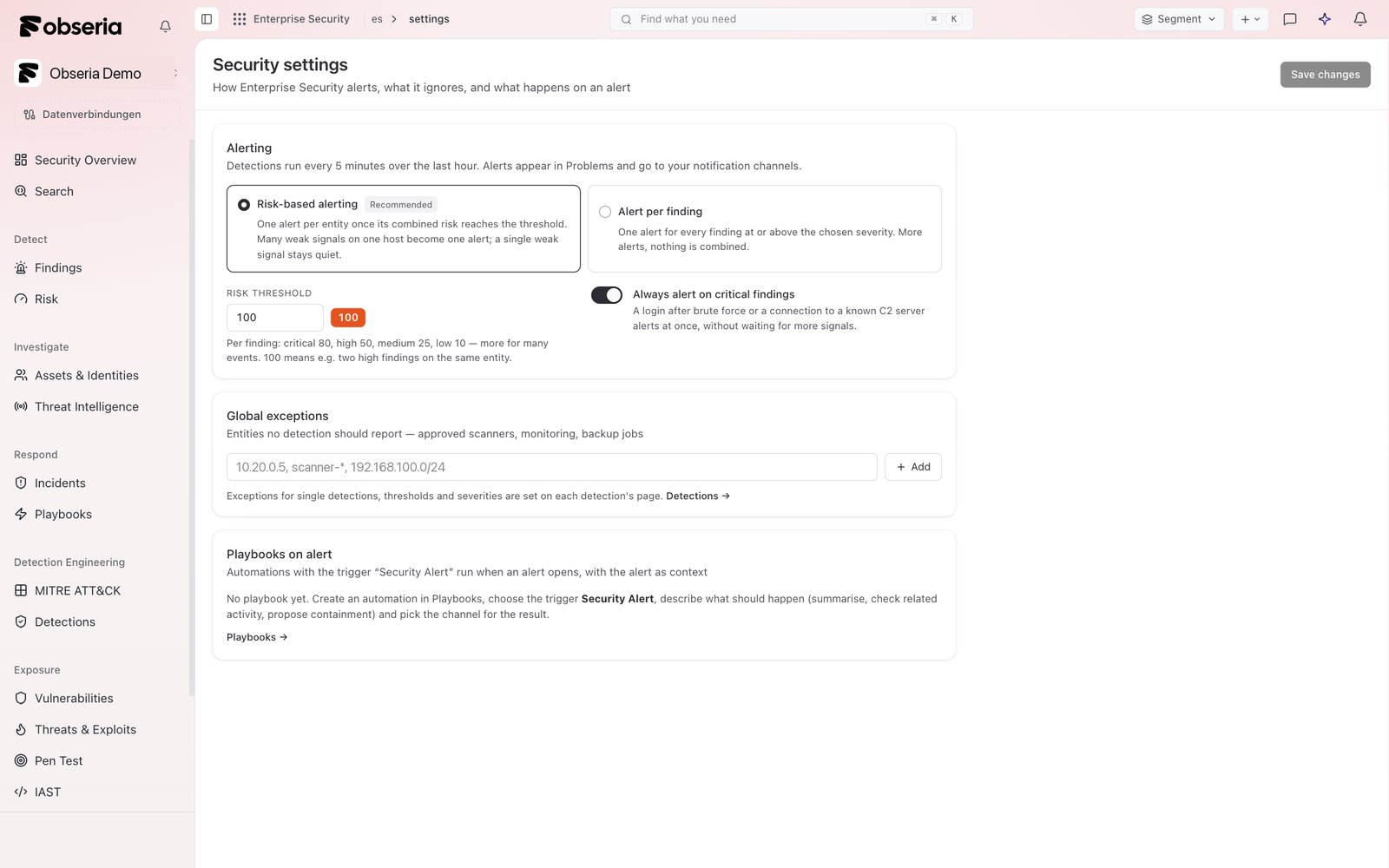
Findings add up per entity until a threshold is reached; critical findings can alert at once, and approved scanners or backup jobs can be excluded.
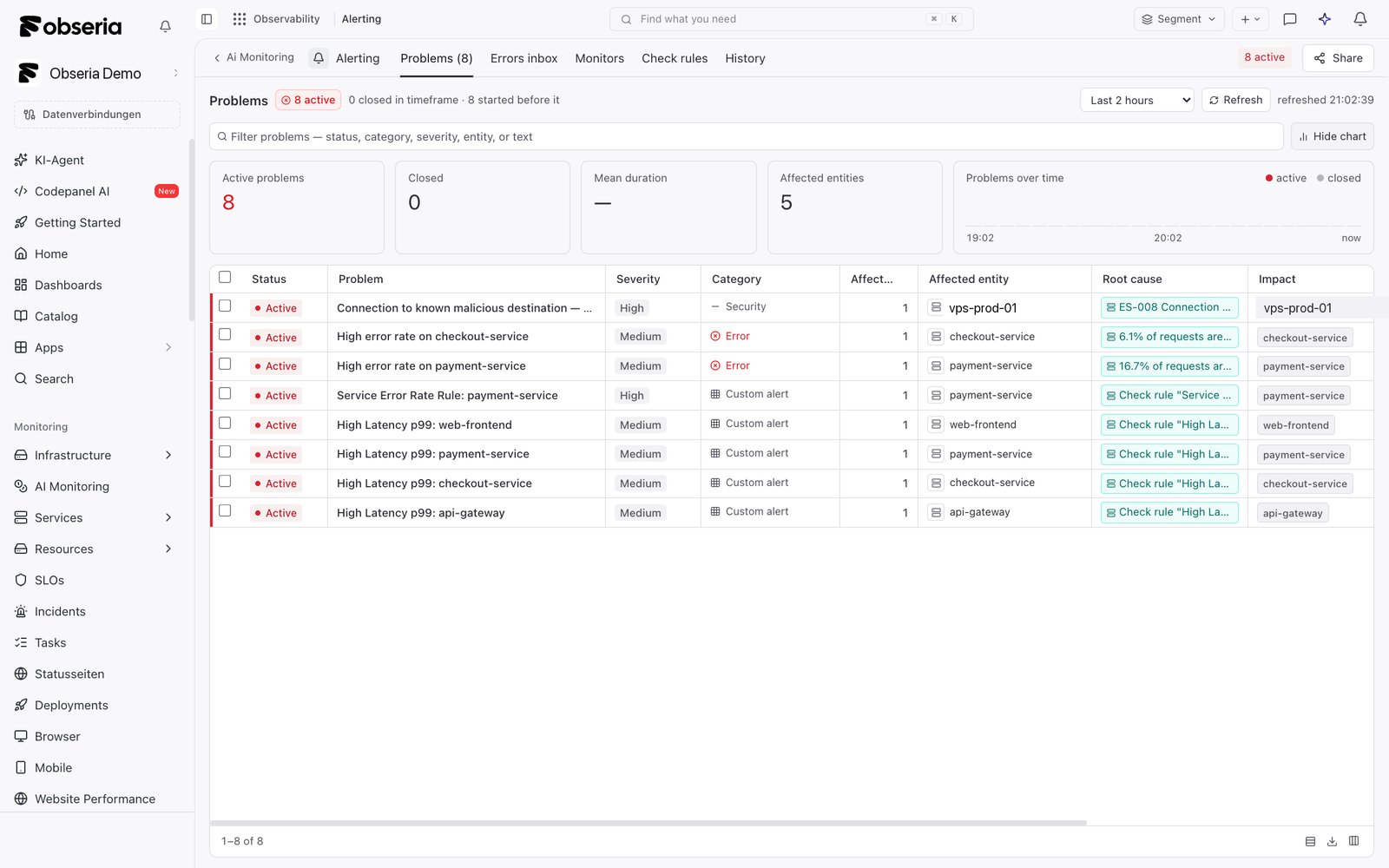
Security alerts appear as problems next to all other alerts and are sent to your notification channels.
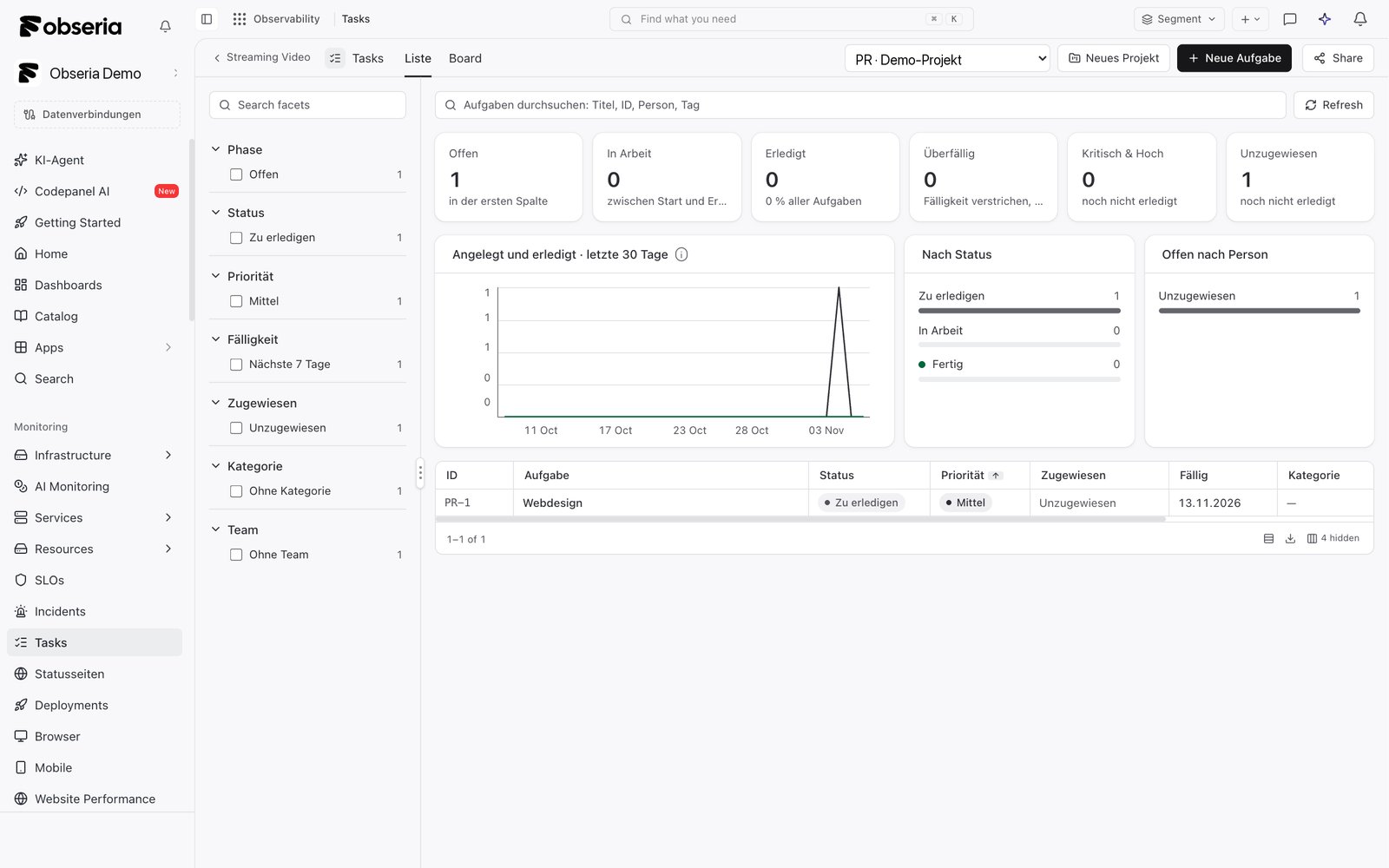
Create tasks for the fixes, with priority, due date and assignee, as a list or board.
Continuously checks cloud accounts against security rules and benchmarks.



Connect AWS, Azure or Google Cloud with read-only credentials and add your Kubernetes clusters.
Obseria checks resources and configurations continuously against its security rules and benchmarks.
Failed rules by severity, manual and passed rules, and a posture bar for every system.
Start with critical and high findings, review manual rules and assign the work.
Detection rules on cloud audit logs and alerts in your channels catch new risky changes.
The Security Posture tab starts with the latest assessment results: how many rules failed, split into critical, high, medium and low, how many need a manual review and how many passed. These six numbers tell you within seconds whether there is something urgent.
Below, Obseria summarises the assessed systems: how many systems are connected, which types they are, how many resources were assessed and how many individual configurations were checked. That shows how much of your environment the posture actually covers.
The same area contains tabs for vulnerabilities, code security, network and runtime threats, so the posture is one part of a wider security overview rather than a separate tool.
A table lists every assessed system with its type, for example an AWS account, an Azure tenant, a Google Cloud project or a Kubernetes cluster. For each one you see passed, manual and failed rules, the total number of rules and the time of the latest assessment.
A posture bar per system makes the ratio visible at a glance. A production account with many failed rules stands out immediately next to a cluster that is mostly in order.
This view helps to decide where to start: the system with the most critical findings, the one that has not been assessed recently, or the one where manual rules are piling up.
Cloud accounts are connected with read-only credentials. Obseria reads the configuration of your resources to assess it, but it does not change settings, delete resources or apply fixes on its own.
That keeps the permissions small and the responsibility clear: your team decides how and when a misconfiguration is fixed, for example in the infrastructure code, so the fix survives the next deployment.
Connected clouds also appear in the cloud views of Obseria, where virtual machines, functions, containers, databases, storage and networks are listed by service and region.
Posture checks show what is configured badly. Detection rules show when something risky happens. In Obseria Security Enterprise both live together: the detection library includes rules on cloud audit logs, for example when someone grants a privileged role such as Owner or Editor in Google Cloud.
Detections run every five minutes over the last hour. With risk-based alerting, findings add up per entity, so many weak signals on one account become one alert while a single weak signal stays quiet; critical findings can alert at once.
Alerts appear as problems and go to your notification channels. From there, findings can be followed up as incidents and tasks.
Amazon Web ServicesMicrosoft AzureGoogle CloudKubernetes GitHub
 Slack
 Microsoft Teams
 PagerDuty
 Jira
Cloud security posture management (CSPM) is the continuous checking of cloud accounts against security rules. Instead of reviewing a cloud environment once a year, a CSPM tool reads the configuration of your resources on a regular schedule, compares it with a rule set and reports every deviation as a finding. The result is the security posture: how many rules pass, how many fail and how severe the failures are.
CSPM looks at configuration, not at traffic or code. It answers questions such as: Is this storage bucket public? Does this account still use broad administrator rights? Is encryption switched on for this database? Is audit logging enabled in every region? These questions are simple on their own, but in an environment with several accounts, subscriptions and projects nobody can answer them by hand every day.
Many cloud security incidents start with a cloud misconfiguration rather than a sophisticated attack. A setting is changed during troubleshooting and never reverted, a test resource is created with open access, or a new service is rolled out without the defaults your team agreed on. Cloud consoles make such changes quick, and infrastructure grows faster than manual reviews can follow.
Typical misconfigurations that CSPM rules look for:
CSPM rules are usually derived from security benchmarks. Industry benchmarks such as those from the Center for Internet Security (CIS) describe recommended settings per cloud provider and for Kubernetes. Many organisations add their own rules on top, for example which regions may be used or which tags every resource needs.
Not every rule can be checked automatically. Some recommendations depend on processes or context, such as whether a contact for security notices is maintained. Good CSPM tools therefore show three results per rule: passed, failed and manual, where manual means a person has to review and confirm the result.
The same idea applies to Kubernetes clusters, often called Kubernetes security posture management (KSPM). Rules check cluster settings such as privileged containers, missing resource limits, broad role bindings or workloads running as root. Because clusters change with every deployment, continuous checking is even more important there than in the cloud accounts themselves.
To keep CSPM from ending as a long list of findings, a few clear metrics help: the number of critical and high failures per account, the share of passed rules, the number of open manual reviews and the age of the latest assessment per system. Teams that review these numbers regularly notice early when new accounts appear without the agreed defaults or when old findings are left open.
Check which clouds and cluster types are supported, how accounts are connected and with which permissions, how rules are grouped by severity, whether manual rules are shown separately, and how findings reach the people who fix them. Also check where the data is stored and whether posture, logs and alerts live in one place or in separate products.
Cloud security posture management is part of Obseria Security Enterprise. In the security area, the Security Posture tab shows:
Cloud accounts are connected with read-only credentials. Obseria checks them continuously against its security rules and benchmarks; it does not change your resources. Detection rules in the same product complement the posture view at runtime, for example an alert when someone grants a privileged role in Google Cloud. Findings and alerts go to your notification channels and can be tracked as incidents and tasks.
Cloud security posture management is the continuous checking of cloud accounts against security rules and benchmarks. It finds misconfigurations such as public storage, overly broad access rights, missing encryption, open network ports or disabled audit logging, and shows the overall security posture.
The posture view shows systems such as AWS accounts, Azure tenants, Google Cloud projects and Kubernetes clusters. The system types of your environment are listed in the overview together with the number of assessed resources and configurations.
No. Cloud accounts are connected with read-only credentials. Obseria reads configuration to assess it and does not change your resources.
Some rules cannot be checked automatically because they depend on processes or context. They are counted as manual, which means a person has to review them. Obseria shows them separately from passed and failed rules.
IaC security in Obseria Code Security checks Terraform, Kubernetes manifests and Dockerfiles in your repositories before deployment. CSPM checks what is actually running in your cloud accounts, including changes made by hand in the console. The two complement each other.
No. Obseria reports findings and alerts your team; it does not change cloud settings. We recommend fixing misconfigurations in your infrastructure code so the fix is not overwritten by the next deployment.
No tool makes an organisation compliant on its own. Posture checks give you evidence about the configuration of your cloud, which can support audits and your own documentation. Obseria does not claim certifications such as ISO 27001 or SOC 2 on your behalf.
Obseria does not remediate findings automatically and does not block changes in your cloud. The specific benchmarks behind the rules are not listed on this page; ask us if you need a mapping to a particular framework. Clouds other than AWS, Azure and Google Cloud are not covered as cloud accounts. Posture checks are available in Obseria Security Enterprise.
Cloud security, SIEM, threat detection and investigation in one product.
→The security overview of all your cloud environments, from posture to runtime threats.
→Check Terraform, Kubernetes manifests and Dockerfiles before they are deployed.
→Controls for your own GDPR documentation and data stored in the EU.
→Pods, restarts, OOM kills and warning events of the clusters you assess.
→In 30 minutes we show you how Obseria works in your environment and answer your questions on setup, privacy and pricing.
